
WisePorter Release Notes 1.9

What’s New in WisePorter 1.9
The second wave of 2026 updates is here. Version 1.9 introduces four-eyes approval, improved handling of product variants, and further advances in everyday data work.
Four-eyes approval directly in WisePorter
Approval of changes in the product catalog has long been available in WisePorter through item states. For many companies — particularly in finance, pharmaceuticals, and anywhere change oversight is critical — this isn’t sufficient. They need the review by two independent people to be enforced by the system, not just a procedural agreement. They need the signature to sit directly on the item. And above all, they need assurance that approved data hasn’t been quietly changed on its way to production.
From version 1.9, the extended approval process is built into WisePorter. For selected item types, it can be configured so that another user must confirm the item before activation (the classic four-eyes check). The signature and timestamp are an integral part of the item’s data. If anyone modifies the item after approval, the signatures are invalidated and the approval round starts over.

Master products and their variants
WisePorter makes it possible to model relationships between products exactly as they exist in practice. A typical example is a medication or dietary supplement that has one general name and shared properties, but is sold in many different pack sizes. The final customer-facing name is then composed automatically from both levels.
Prior to version 1.9, these relationships could only be modeled through categories, which were not primarily designed for this purpose. From version 1.9, masters and variants can be defined directly as item types with the correct hierarchy. WisePorter also automatically ensures that a variant is only available for sale when its parent master product is active. For standard products without variants, nothing changes.
Bulk attachment management without manual preparation
WisePorter allows images, documents, and technical sheets to be attached to each product. These can be managed manually through the interface, in bulk via FTP, or through Excel import, where each attachment has its own row. Each attachment requires a slot on the product — an envelope into which the specific file is stored. Prior to version 1.9, Excel import could only update attachments — the slots already had to exist on the product, and they could only be created manually within the application. Only then could they be worked with in bulk.
From version 1.9, attachments can be added directly via import, including their slots. Data preparation, assignment to products, and file uploading all happen through Excel without unnecessary intermediate steps.
Relationship table — new capabilities
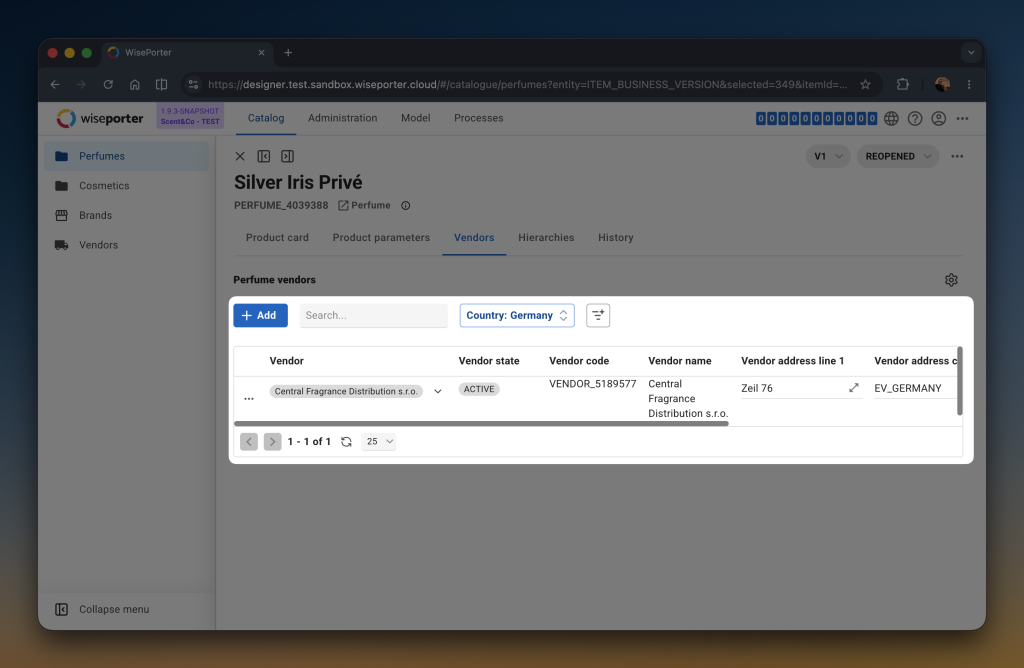
WisePorter allows products to be linked to one another — as alternatives, successors, predecessors, or package components. All connections are visible directly in the product detail view in the relationship table. Prior to version 1.9, the table only showed the name and code of the linked item. If more information was needed — such as a product’s status or specific parameters — the user had to navigate elsewhere.
The table can now be configured to display exactly what is needed. Full-text search will be particularly welcomed by teams working with products that have hundreds of connections, such as investment products with large numbers of securities. Filters also work with properties of linked products, not just their names, and each user can set column widths to their own preference.
More flexible work with import files
When working with product data, Excel is often used not just for the data itself but also for its preparation — notes, validation calculations, helper tables. This used to be a problem when the entire file needed to be imported, as WisePorter expected only data sheets and everything else had to be deleted beforehand.
From version 1.9, this is no longer necessary. Import files can include helper sheets, which the system simply ignores during processing and reads only the data. The entire data preparation process can be handled in a single file, with no need to maintain multiple versions or edit files before importing.
Control over attachment sharing
Product data often includes various types of documents — technical sheets, manuals, marketing materials, certificates. Not all of them belong in every context. A technical document may be intended only for the internal team, while marketing material is meant for partners or customers.
WisePorter now allows each attachment to have its visibility configured. Documents can easily be designated for internal use only, shared with partners, or marked for publication to external channels. This gives greater control over which documents appear in which parts of the system and where they are published.
Parameter management consolidation — first step
In companies with a large number of products, parameters quickly begin to diverge. The same parameter exists in multiple places but with slightly different definitions. Changes then have to be made repeatedly and inconsistencies in the data arise.
WisePorter is therefore gradually updating the way parameters are managed. Version 1.9 brings the first step — unifying the basic properties of parameters across the system. A parameter has one central definition that is applied everywhere it is used.